Basics of Computer and programming
| Site: | Dr. B.R. Ambedkar Open University Online Learning Portal |
| Course: | Basics of Programming with Python |
| Book: | Basics of Computer and programming |
| Printed by: | Guest user |
| Date: | Saturday, 30 May 2026, 1:56 AM |
Description
This books covers various topics Computer basics, algorithms, flowchart, software and programming.
Note : This is mandatory to complete. After completing, you can manually mark the activity as completed
1. Computer Basics
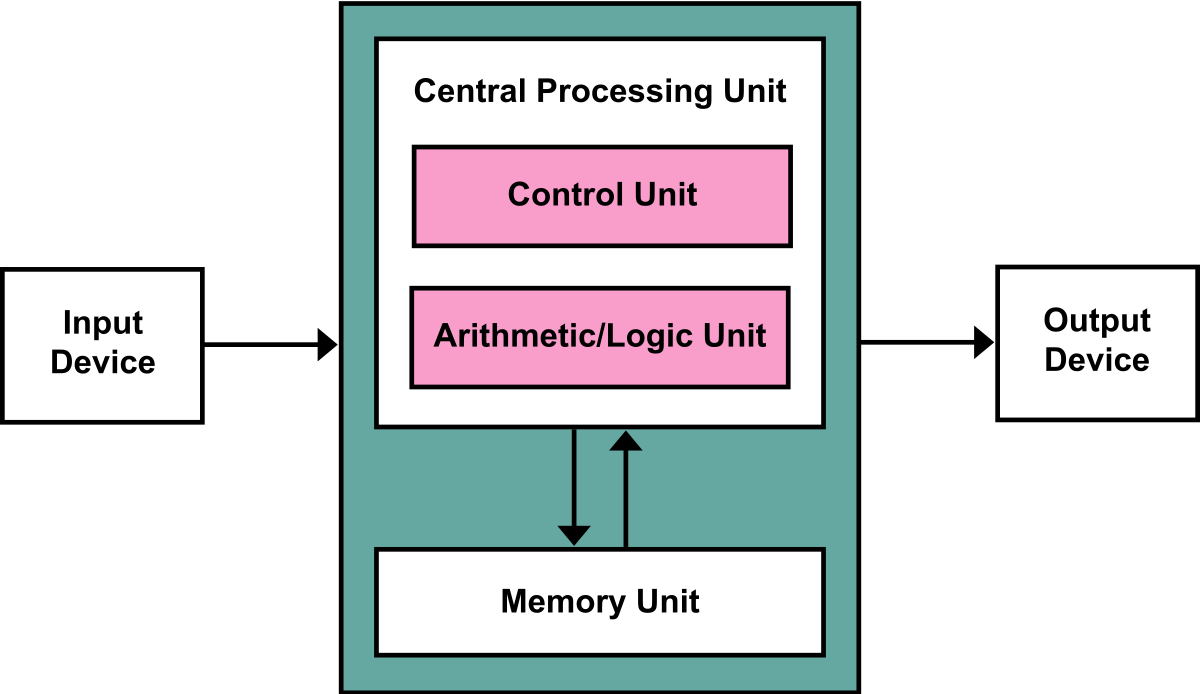
Figure : The von Neumann computer architecture.
"Computer Hardware" by wikilectures is licensed under CC BY-SA 4.0
2. Basic Concepts
-
A computer is an electronic device that processes data and performs tasks based on instructions.
-
It consists of hardware (physical parts) and software (programs that run on it).
-
Python is a high-level, easy-to-read programming language widely used today.
-
It supports simple syntax, making it great for beginners to learn coding concepts.
-
With Python, we can solve problems, automate tasks, and build applications efficiently.
2.1. Software
Software is a set of instructions or programs that tells a computer what to do or how to perform a specific task (computer software runs on hardware).Main types of software – systems software and application software
"Computer software" by opentextbc is licensed under CC BY-SA 4.0
2.2. Algorithm
From programming point of view,
An algorithm is a step by step procedure (technique) for solving any problem.
An algorithm is an effective method expressed as a finite set of well defined instructions.
Refers to the logic of a program and step by step description of how to arrive at the solution of a given problem.
For example, find the sum of two numbers.
Step 1: Start
Step 2: Input A
Step 3: Input B
Step 4: Calculate C = A + B
Step 5: Output C
Step 6: Stop
Step 1: Start
Step 2: Take water in a kettle.
Step 3: Place the kettle on the oven.
Step 4: Turn the oven on.
Step 5: Check whether water is boiled
Step 6: Turn the oven off
Step 7: Stop
"Algorithm and Flowchart" by Bangladesh Open University is licensed under CC BY-SA 4.0
2.3. Flowchart
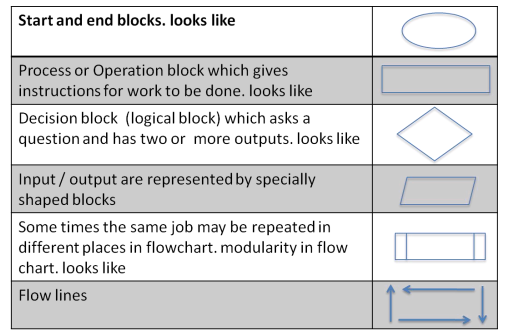
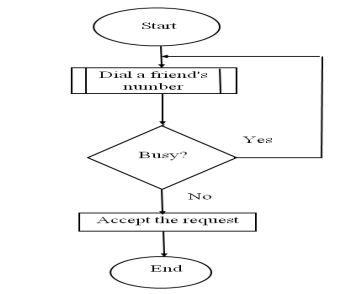
- A flowchart is a graphical/ pictorial representation of an algorithm. a flowchart is most helpful in planning, designing, and structuring a program.
- Uses symbols (boxes of different shapes) that have standardized meanings to denote different types of instructions.
- Process of drawing a flowchart for an algorithm is called flowcharting.
- Boxes are connected by solid lines having arrow marks to indicate exact sequence in which the instructions are to be executed.
Symbols of Flowchart
"Algorithm and Flowchart" by Bangladesh Open University is licensed under CC BY-SA 4.0
3. What is Programming
Developing a program involves steps similar to any problem-solving task. There are five main steps in the programming process:
- Defining the problem — Finding for an active Problem.
- Planning the solution — Defining a solution to the problem.
- Coding the program — Writing the code.
- Testing the program — Making sure the code works well by debugging and testing.
- Documenting the program — Documentation is a written detailed description of the programming cycle and specific facts about the program.
"What is programming?" by scratchwiki is licensed under CC BY-SA 4.0